


Gallery Locker-Hide App Photos APK download for Android. Gallery Locker app has the most advanced security features to Hide Apps, Hide Photos, Videos & Hide

Gallery Locker-Hide App Photos
Download xapk
(23.49 MB)
Screenshot
Description
Content
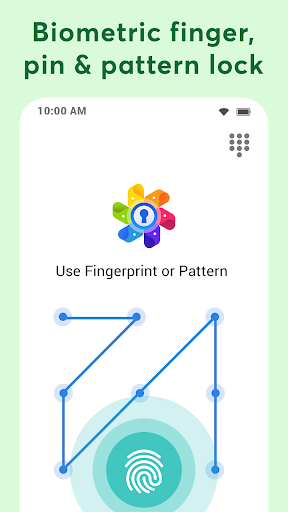
Gallery Locker app has the most advanced security features to Hide Apps, Hide Photos, Videos & Hide Files inside private space using biometric fingerprint lock, PIN & pattern lock.
Your hidden apps remain secret to your friends & family. Everything will be truly protected in your private vault.
Main Features:
🔐 Hide Apps
Hide social apps and games into the gallery locker. Only you can see hidden apps protected inside private space. App hider feature allows you to hide applications in hidden space with password protection.
Note that App hider feature uses Launcher functionality to work. You need to set our App as Default Home Launcher in order to hide apps.
📷 Hide Photos, Videos & Files
Secure personal photos, videos, sensitive documents, notes & contacts with PIN protection, fingerprint lock and pattern lock. Photo locker is the safest place to hide pictures. You can also hide audio files & add notes.
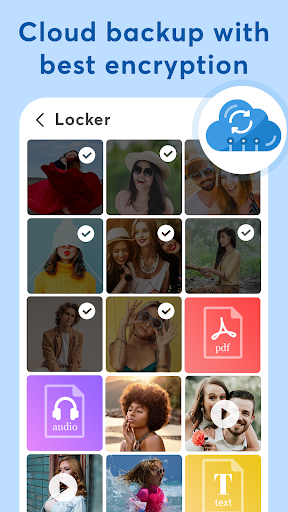
📤 Cloud Backup
Automatic backup videos, photos, apps, music, contacts and important documents using cloud drive with one click. Never lose your data again when you hide files or hide apps. Sync your files around multiple devices in real time.
📲 File Transfer
Easily transfer files from old phone to new phone or tablet by scanning QR code using the same Wi-Fi or hotspot connection. You can also transfer files from computer to secret gallery & vault without using internet data.
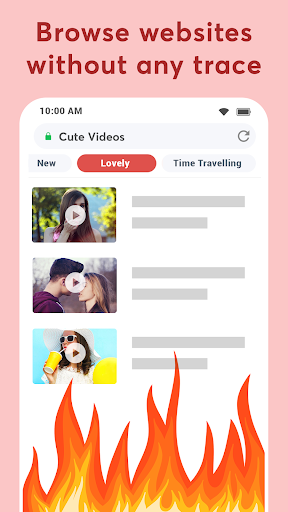
🕵️ Private Browser
Download photos and videos from a secret browser. Leave no traces of browsing history after you exit into video locker.
📁 Folders Lock
Set password to individual folders & keep it safe from others. Also useful as an album locker to hide videos.
🚨 Intruder Alert
Automatically captures intruder selfie when someone tries to break in your privacy by entering the wrong PIN, password or Fingerprint.
🌈 Dynamic Themes
Support Light & Dark mode with a variety of fashionable colors and dynamic themes as per your wallpaper on your smartphone.
🎭 Fake Locker
Use an alternate password to open different gallery photos vault. Protect your privacy during unexpected situations.
More Useful Tools:
✔️ File management with sort, list, grid, rename, move, lock photos & export.
✔️ Face down auto lock during a panic situation.
✔️ Inbuilt video player and image viewer inside photo hide app.
✔️ SD-Card support in this photo hider.
✔️ Directly hide files from third party gallery or file manager apps by “Share to Gallery Locker”.
✔️ Set the folder cover of your choice.
✔️ Recycle bin to restore private video files deleted by mistake.
✔️ Fingerprint unlock with devices supporting fingerprint sensor.
✔️ Pin the most important and frequently used folders at the top.
Gallery locker app comes with latest user experience & much needed features like Hide Apps, Cloud Sync and Dark Mode.
Q: Will I get my files back if I reinstall the app?
A: Yes. Install this Gallery photos vault again and you will be asked if you wish to restore previous locker data.
When use the drive backup to hide photos, your files will be stored fully encrypted into your personal drive space and could not be readable out of your app.
Introduction
Gallery Locker-Hide App Photos is a robust and feature-rich application designed to protect and organize sensitive photos and videos on Android devices. It offers an array of powerful tools and customization options to ensure privacy, security, and seamless media management.
Key Features
* Privacy Protection: Gallery Locker conceals private photos and videos behind a secure PIN, password, or fingerprint lock, preventing unauthorized access.
* App Disguise: The app can be disguised as a harmless calculator, adding an extra layer of protection by hiding its true identity.
* Fake Cover: Create a decoy gallery with different photos to mislead potential intruders.
* Intrusion Detection: Capture photos of anyone attempting to access the app without authorization.
* Break-in Alerts: Receive instant notifications if someone tries to break into the app, providing real-time monitoring.
* Stealth Mode: Hide the app from the app drawer and recent apps list, making it virtually invisible.
* Media Organization: Gallery Locker allows for the creation of custom albums and folders, enabling users to categorize and organize their media for easy retrieval.
* Backup and Restore: Back up sensitive photos and videos to cloud storage for added protection against data loss.
Customization Options
Gallery Locker offers extensive customization options to tailor the app to individual preferences:
* Lock Type: Choose from a variety of lock methods, including PIN, password, fingerprint, and pattern.
* Background Theme: Personalize the app's appearance with a range of themes.
* App Icon: Replace the default app icon with a custom image to further conceal the app's true purpose.
* Notification Settings: Configure notification preferences to receive alerts for break-in attempts, new photos, and other events.
User Experience
Gallery Locker is designed to be user-friendly and intuitive. Its clean and well-organized interface allows for effortless navigation and media management. The app supports both light and dark themes, adapting to the user's preference.
Security and Reliability
Gallery Locker employs robust encryption algorithms to protect sensitive media from unauthorized access. It has been extensively tested and proven to be highly reliable, ensuring the safety and integrity of private photos and videos.
Conclusion
Gallery Locker-Hide App Photos is an essential tool for anyone seeking to safeguard their privacy and organize their media effectively. Its comprehensive features, customization options, and unwavering security make it the ultimate solution for protecting and managing sensitive photos and videos on Android devices.
Information
Version
84
Release date
Oct 23 2022
File size
23.49 MB
Category
Photography
Requires Android
7.0 and up
Developer
Photo Video Vault
Installs
500K+
ID
gallerylocker.hideapps.apphider.vault.applock
Available on










High Quality Apps
-
 Oojao multi layer photo editorPhotographyAPK
4.14
GET -
 Passport Photo Maker, ID PhotoPhotographyXAPK
GET -
 Boys Fashion Jacket SuitsPhotographyAPK
GET -
 DSLR Photography Training appsPhotographyapk
4.1
GET -
 Photo To Silhouette MakerPhotographyAPK
3.1
GET -
 Bimostitch Panorama StitcherPhotographyapk
3.5
GET