
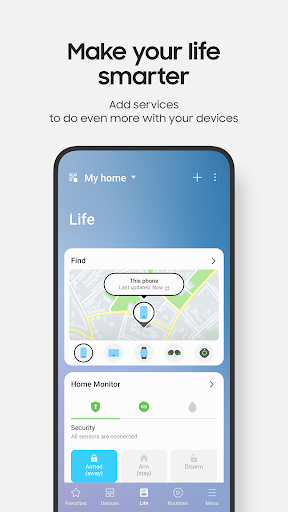
SmartThings APK download for Android. Quickly and easily connect and control your smart home devices through SmartThings.SmartThings is co

SmartThings
Download APK
(105.17 MB)
Screenshot
Description
Content
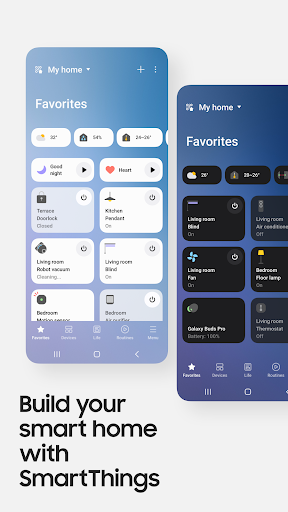
Quickly and easily connect and control your smart home devices through SmartThings.
SmartThings is compatible with 100s of smart home brands.
So, you can control all of your smart home gadgets in one place, including your Samsung Smart TV and smart home appliances.
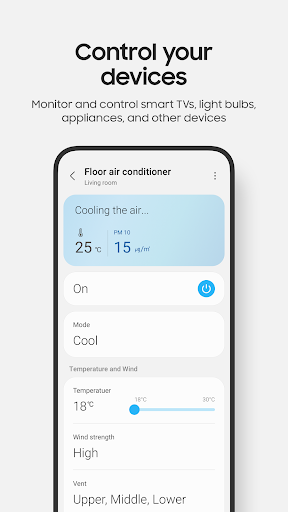
With SmartThings, you can connect, monitor and control multiple smart home devices quicker and easier.
Connect your Samsung smart TVs, smart appliances, smart speakers and brands like Ring, Nest and Philips Hue - all from one app.
Then control your smart devices using voice assistants including Alexa, Bixby and Google Assistant
[Key Features]
- Control and check in on your home from wherever you are
- Build routines that are set on time, weather, and device status, so your home runs smoothly in the background
- Allow shared control by giving access to other users
- Receive status updates about your devices with automated notifications
※ SmartThings is optimized for Samsung smartphones.
Some features may be limited when used with other vendors' smartphones.
※ Some features may not be available in all countries.
※ You can also install SmartThings on Wear OS-based watches.
※ SmartThings for Wear OS is only available when the watch is connected to a mobile phone.
You can get a quick access to routine run and device control by adding SmartThings tile on your watch.
We provide SmartThings complications that allow you to enter SmartThings app service directly from watchface.
[App requirements]
Some mobile devices may not be supported.
- RAM size : 2GB over
- Galaxy : Smart View to support screen mirroring
※ App permissions
The following permissions are required for the app.
You can use the app without optional permissions, but some functions may be limited.
[Optional access permissions]
• Location : Used to locate your devices, create routines based on your location, and scan for nearby devices using Wi-Fi
• Nearby devices : (Android 12 ↑) Used to scan for nearby devices using Bluetooth Low Energy (BLE)
• Notifications : (Android 13 ↑) Used to provide notifications about SmartThings devices and features
• Camera : Used to scan QR codes so you can easily add members and devices to SmartThings
• Microphone : Used to add certain devices to SmartThings using high-frequency sounds
• Storage : (Android 9~11) Used to save data and share content
• Files and media : (Android 12) Used to save data and share content
• Photos and videos : (Android 13 ↑) Used to play photos and videos on SmartThings devices
• Music and audio : (Android 13 ↑) Used to play sound and video on SmartThings devices
• Phone : (Android 9) Used to make calls on smart speakers and show information about people sharing content with you
• Phone : (Android 10 ↑) Used to make calls on smart speakers
• Contacts : (Android 9) Used to get phone numbers of your contacts to send text message notifications and to show the names of people who send content to your devices
• Contacts : (Android 10 ↑) Used to get phone numbers of your contacts to send text message notifications
• Physical activity : (Android 10 ↑) Used to detect when you start pet walks
SmartThings is a comprehensive home automation platform that seamlessly connects and controls various smart devices within your home.
With a user-friendly interface and extensive compatibility, it empowers you to create a personalized and automated living space.
Hub for Device Integration:
SmartThings acts as a central hub that integrates a wide range of smart devices from multiple manufacturers.
It supports a vast ecosystem of compatible devices, including lights, thermostats, door locks, sensors, and appliances.
This integration allows you to control all your smart devices from a single platform, providing a cohesive and centralized management experience.
Automated Routines:
SmartThings enables you to create automated routines that trigger specific actions based on pre-defined conditions.
For instance, you can set a routine to automatically turn on lights when you enter a room or adjust the thermostat to a comfortable temperature when you arrive home.
These automations simplify your daily tasks and enhance your comfort and convenience.
Remote Access and Control:
With the SmartThings app, you can remotely access and control your smart devices from anywhere with an internet connection.
This feature allows you to monitor your home, adjust settings, and respond to alerts even when you're away.
It provides peace of mind and empowers you to manage your home remotely.
Security and Monitoring:
SmartThings offers robust security features to protect your home and keep it safe.
It integrates with smart sensors and security cameras to provide real-time monitoring and alerts.
You can receive notifications if any unusual activity is detected, enabling you to respond promptly to potential threats.
Voice Control and Integrations:
SmartThings seamlessly integrates with popular voice assistants such as Amazon Alexa and Google Assistant.
This allows you to control your smart devices hands-free using voice commands.
Additionally, it supports integrations with other platforms and services, such as IFTTT and Samsung SmartThings+, further expanding its functionality and customization options.
Personalized Experiences:
SmartThings tailors the user experience to your specific needs and preferences.
It learns your habits and routines over time, suggesting automations and optimizations that enhance your daily life.
The platform also provides personalized recommendations and insights to help you get the most out of your smart home.
Conclusion:
SmartThings is a powerful and versatile home automation platform that transforms your living space into a connected and intelligent environment.
By integrating a wide range of smart devices, enabling automated routines, providing remote access and control, and offering robust security features, it empowers you to create a personalized and simplified home that enhances your comfort, convenience, and peace of mind.
Information
Version
Release date
Apr 18 2017
File size
105.17 MB
Category
Lifestyle
Requires Android
Developer
Samsung Electronics Co., Ltd.
Installs
500M+
ID
com.samsung.android.oneconnect
Available on